User Guide
Computing Validation Artifacts
Artifact engines provide a unified interface for computing validation artifacts in a given application domain.
Create an engine instance with your resource specification, then use the engine's methods to compute individual artifacts by specifying the artifact type and input data.
import pandas as pd

from artifact_core.table_comparison import (
    TableComparisonEngine,
    TableComparisonPlotType,
    TabularDataSpec
)

df_real = pd.read_csv("real_data.csv")

df_synthetic = pd.read_csv("synthetic_data.csv")

data_spec = TabularDataSpec.from_df(
    df=df_real,
    cat_features=categorical_features,
    cont_features=continuous_features
)

engine = TableComparisonEngine(resource_spec=data_spec)

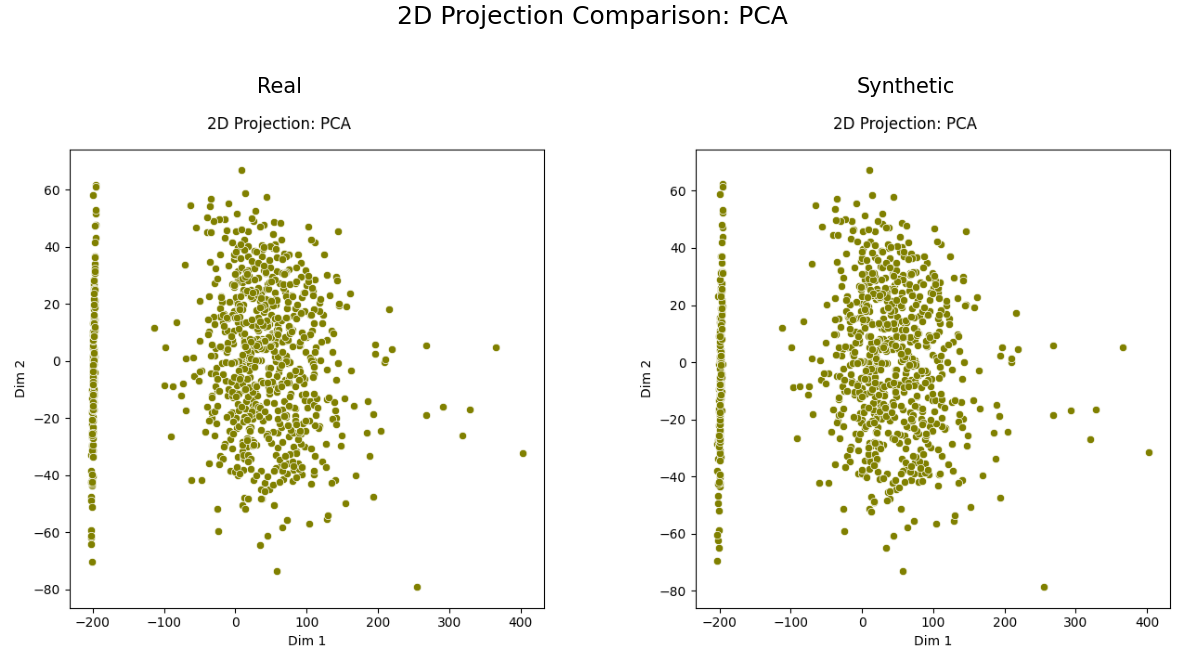
pca_plot = engine.produce_dataset_comparison_plot(
    plot_type=TableComparisonPlotType.PCA_JUXTAPOSITION,
    dataset_real=df_real,
    dataset_synthetic=df_synthetic,
)

pca_plot
Configuring Artifact Hyperparameters
When using artifact-core as a package in your own project, you can override the default configuration of existing artifacts.
Steps
- Create a
.artifact-mldirectory in your project root. - Create a configuration file named after the domain toolkit of interest (e.g.,
table_comparison.json). - Specify your custom configuration in JSON format.
- Your configuration override will be automatically detected and merged with the default one---with your settings taking precedence.
Config File Structure
The configuration file follows the same structure as the default configuration:
{
  "scores": {
    "score_type_name": {
      "param1": value1,
      "param2": value2
    }
  },
  "arrays": { ... },
  "plots": { ... },
  "score_collections": { ... },
  "array_collections": { ... },
  "plot_collections": { ... }
}
Only include the sections and parameters you want to override.
Your configuration will be merged with the default one automatically, with your settings taking precedence.
Example
The following example illustrates how to override table comparison artifact configurations.
Create a file at .artifact-ml/table_comparison.json in your project root:
{
  "scores": {
    "MEAN_JS_DISTANCE": {
      "n_bins_cts_histogram": 200,
      "categorical_only": true
    }
  },
  "plots": {
    "TSNE_JUXTAPOSITION": {
      "perplexity": 50,
      "learning_rate": 200,
      "max_iter": 2000
    }
  }
}
This will override the default settings for the MEAN_JS_DISTANCE score and the TSNE_JUXTAPOSITION plot, while keeping the default settings for all other artifacts.
Implementing Custom Artifacts
artifact-core supports project-specific custom artifacts, enabling users to extend domain toolkits with specialized validation logic tailored to their unique requirements.
Custom artifacts integrate seamlessly with the existing framework infrastructure while providing complete flexibility.
Creation
1. Configure Custom Artifact Path
Update the relevant domain toolkit configuration file (see the relevant section above) to point to your custom artifacts directory. Note that the required path is to be specified relative to the parent of the .artifact-ml folder hosting the relevant config file---typically your project root. The setup is clarified in the artifact-core demo.
{
  "custom_artifact_path": "/path/to/your/custom_artifacts",
  "score_collections": {
    "CUSTOM_SCORE": {
      "param1": value1,
      "param2": value2
    }
  }
}
2. Implement Custom Artifact
Create your custom artifact by extending the appropriate base class.
Select the relevant domain-specific registry corresponding to your artifact's modality (e.g. score, array, plot etc.) and register your implementation.
import pandas as pd
from artifact_core._base.artifact_dependencies import NO_ARTIFACT_HYPERPARAMS
from artifact_core.table_comparison._artifacts.base import TableComparisonScore
from artifact_core.table_comparison._registries.scores.registry import TableComparisonScoreRegistry

@TableComparisonScoreRegistry.register_custom_artifact("CUSTOM_SCORE")
class CustomScore(TableComparisonScore[NO_ARTIFACT_HYPERPARAMS]):
    def _compare_datasets(
        self, dataset_real: pd.DataFrame, dataset_synthetic: pd.DataFrame
    ) -> float:
        # Implement your custom validation logic
        custom_metric = compute_your_metric(dataset_real, dataset_synthetic)
        return custom_metric
If your custom artifact requires configuration parameters create a corresponding hyperparameters class and pass the desired values in the toolkit config file:
from dataclasses import dataclass
from artifact_core._base.artifact_dependencies import ArtifactHyperparams

@dataclass
class CustomScoreHyperparams(ArtifactHyperparams):
    threshold: float
    use_weights: bool

@TableComparisonScoreRegistry.register_custom_artifact_hyperparams("CUSTOM_SCORE")
@dataclass
class CustomScoreHyperparams(ArtifactHyperparams):
    threshold: float
    use_weights: bool

@TableComparisonScoreRegistry.register_custom_artifact("CUSTOM_SCORE")
class CustomScore(TableComparisonScore[CustomScoreHyperparams]):
    def _compare_datasets(self, dataset_real: pd.DataFrame, dataset_synthetic: pd.DataFrame) -> float:
        # Access hyperparameters via self._hyperparams.threshold, self._hyperparams.use_weights
        return computed_score
{
  "scores": {
    "CUSTOM_SCORE": {
      "threshold": 0.5,
      "use_weights": true
    }
  }
}
Usage
Once configured, custom artifacts can be used exactly like built-in ones:
# Use custom artifact with string identifier
custom_score = engine.produce_dataset_comparison_score(
    score_type="CUSTOM_SCORE",
    dataset_real=df_real,
    dataset_synthetic=df_synthetic,
)
Contribution
If you develop a custom artifact that could benefit the broader community, consider contributing it.
Custom artifacts that demonstrate broad applicability, statistical rigor, and clean implementation are excellent candidates for inclusion in the core framework.
For general contribution guidelines, please consult the following page.